Free play
Moonlight Princess Free Demo
Stake's Fun Play mode lets you try the tumbles, the multiplier hearts and even the bonus buy with virtual credits. Here's how to open it and what to look for while you play.
How to open the demo

Moonlight Princess launched as an Only on Stake game, so the demo lives on Stake's game page. We don't embed it here, because Stake controls where the game is shown. On a phone the demo works the same way, in portrait: see the mobile guide.
In the lobby, the game appears as the tile on the left: the smiling princess in a gold crown, making a V sign. You'll find it in the Only on Stake, New Releases and Enhanced RTP sections.
-
Go to the game page
Open Moonlight Princess at Stake with the button above or from the Only on Stake section.
-
Choose Fun Play
Below the game, switch from Real Play to Fun Play. When we tried it, the game loaded with $100,000 of virtual credits and a $2.00 bet.
-
Skip the intro
The game opens on an intro screen with the princess and "Win up to 5000 x bet". Press the round button on it to reach the grid. Tick "Don't show next time", or use the settings, to skip it later.
-
Read the rules
The i button at the bottom left opens seven pages of rules: the paytable, tumbles and multipliers, free spins, RTP and bet limits.
What's on the screen
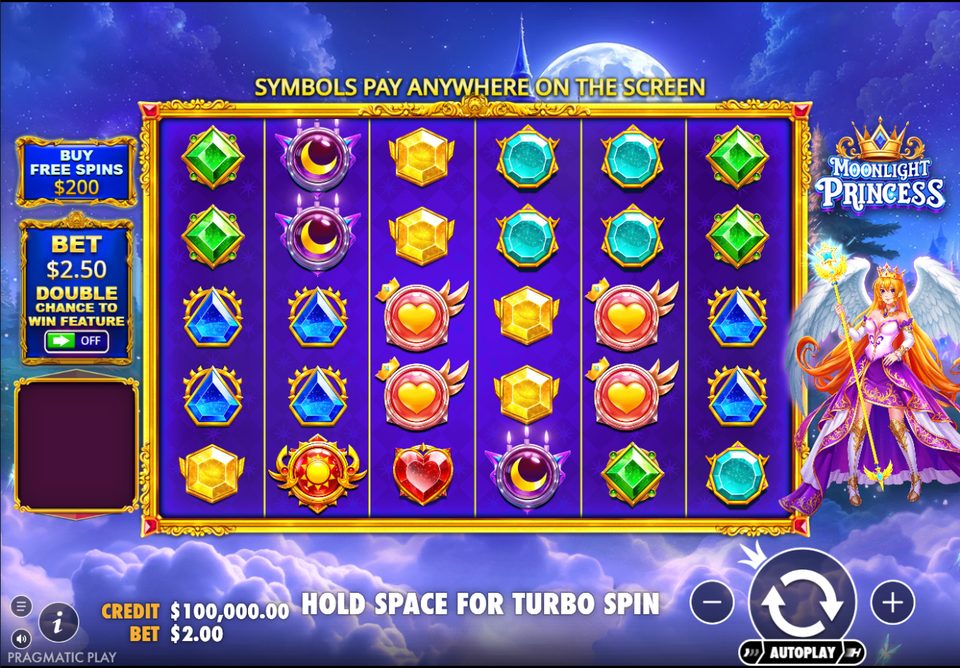
- The grid
- 6 columns and 5 rows of symbols in a gold frame, under a full moon.
- Buy Free Spins
- Top left, with the price at your current bet.
- Double Chance to Win
- Below it, the ante switch with the raised bet shown above the ON/OFF toggle.
- Win panel
- The empty box on the left lists each winning symbol and what it paid.
- Credit and bet
- Bottom left, your balance and bet.
- Spin, − and +
- Bottom right, with the Autoplay button underneath. Hold the space bar for turbo spins.
Setting your bet
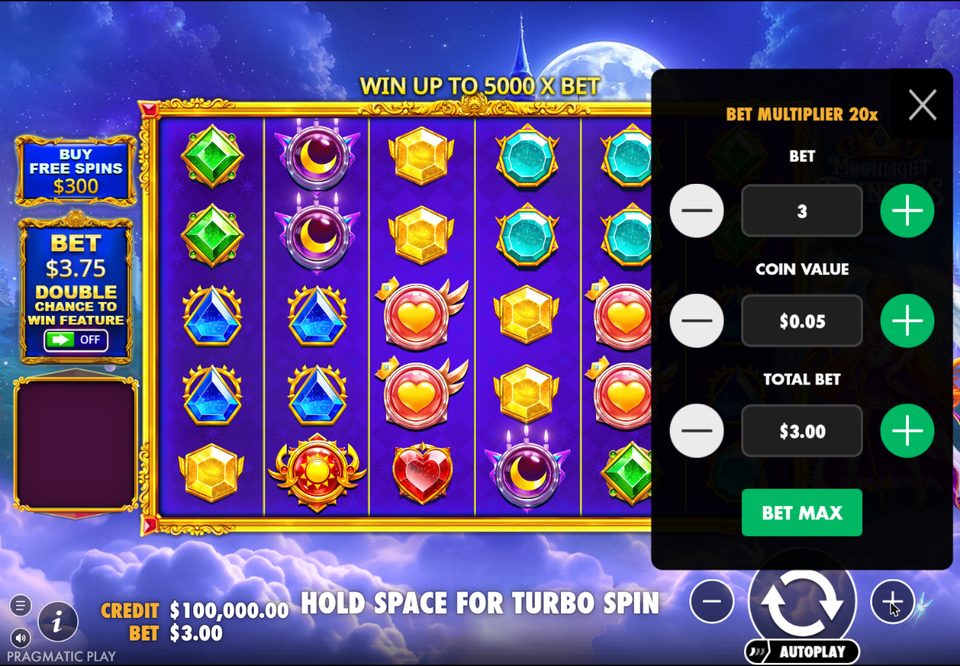
The − and + buttons change the bet. In our demo, pressing + also opened the full bet menu, which shows how the bet is built:
- Bet multiplier 20x: every spin plays 20 coins. With the ante on, it becomes 25.
- Bet (a level such as 3) and coin value (such as 0.05) set how much each coin is worth.
- Total bet is 20 × level × coin value: 3 × 0.05 × 20 = 3.00.
- Bet max jumps straight to the highest bet. Use it with care.
The bonus buy price always follows the total bet: at 3.00 it reads 300.
What to test first
- How often you win. Count how many spins pay something. Medium volatility means small gem wins come quite often.
- Multiplier hearts in the base game. Watch how often a heart lands on a spin that also wins.
- The bonus buy. Buy a few rounds with virtual credits and note what each returns against its 100x price.
- The total multiplier. In free spins, check which spins use the total and which don't.
- The ante bet. Play a stretch with Double Chance to Win on and a stretch with it off, and compare how often free spins start.
Fun Play vs real money
| Topic | Fun Play | Real Play |
|---|---|---|
| Credits | Virtual, $100,000 to start | Your own money |
| Winnings | Can't be withdrawn | Can be withdrawn |
| Account | Not needed when we tried it | Required, with age checks |
| Rules and features | All features, including the buy | The same rules |
| Bonus buy | Paid with virtual credits | Paid with real money |
A good demo run doesn't predict real results. Each spin is independent, and the RTP only shows over a very large number of spins.
If the game won't load
- Your country
- Stake doesn't operate everywhere. Where it's restricted, you'll see a notice instead of the game.
- Sign-in
- Depending on where you are, Stake may ask you to sign in before it shows a game.
- Browser settings
- Strict privacy extensions can block game scripts. Try a standard browser window.
Don't use workarounds to reach a casino that isn't available where you live. Check the where to play page for what to look for before you sign up anywhere.