On the go
Moonlight Princess on Mobile
Moonlight Princess runs in any modern phone browser, on iPhone and Android, with no app to install. Held upright, the game switches to its own portrait layout. Here's what it looks like and where everything is.
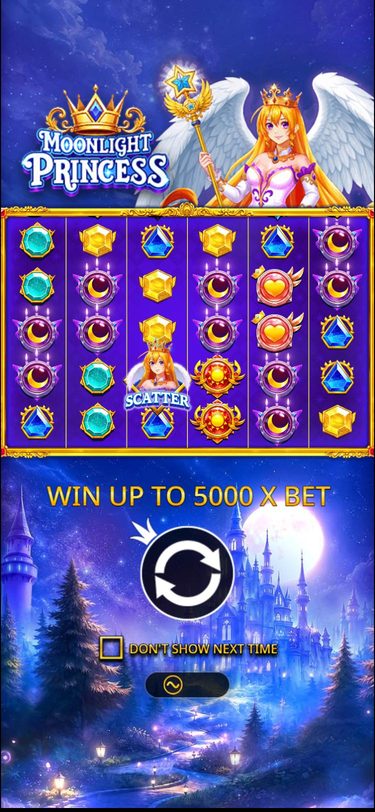
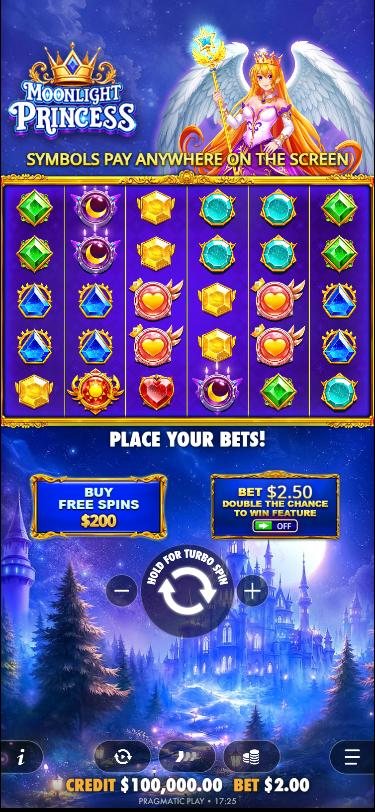
The portrait layout
On a phone held upright, the game stacks everything in one column so the grid can use the full width of the screen:
- Top: the Moonlight Princess logo and the princess.
- Middle: the 6×5 grid, with a banner above it that switches between messages such as "Symbols pay anywhere on the screen".
- Below the grid: Buy Free Spins on the left and the Double Chance to Win switch on the right.
- Centre: the big spin button with − and + to change the bet.
- Bottom bar: rules (i), autoplay, spin speed, the bet menu and the settings menu, with your credit and bet underneath.
Desktop vs mobile
| Topic | Desktop | Phone |
|---|---|---|
| Rules, RTP and max win | 98.00%, 5,000x | The same |
| Features | Ante bet, bonus buy, autoplay | The same |
| Layout | Grid in the middle, princess on the right | Portrait: one column, buttons below the grid |
| Turbo spin | Hold the space bar | Hold the spin button ("Hold for turbo spin") |
| App | Not needed | Not needed, it runs in the browser |
Tips for playing on a phone
- Use a recent browser. Safari on iOS and Chrome on Android both run the game well. Keep them updated.
- Watch your data. The first load downloads the game's graphics and sounds. After that, each spin uses very little data.
- Mind your speed. Turbo spins are one long press away, and with autoplay it's easy to lose track of what you spend.
- Set limits in your casino account before you play. They work the same on every device.